
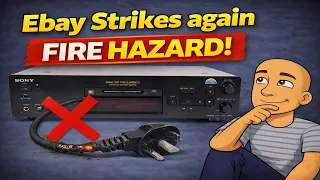
Ohh Ebay – FIREHAZZARD Sony MDS-JB940QS
https://www.youtube.com/watch?v=2vMA-QS24sQ
A friend bought a used MiniDisc player online. It was advertised as refurbished. But when it arrived, the power cord was a terrible mess. It was chopped and spliced together in an unsafe way. This is a common issue with older electronics bought second-hand. The good news is that fixing it properly is a simple and safe task. This guide will show you how to repair a broken power cable on a device like a Sony MiniDisc player. You'll learn the right tools and steps to make your gear safe and reliable again.
The Danger of a Bad Power Cable Repair
The MiniDisc player in the video, a Sony MDS-940, had a major problem. Someone had hacked the power cable. They cut off the original plug. Then, they joined on a new piece of cable using a dangerous method.
The wires were just twisted together. They were not soldered. They were not put in a proper connector. There was no protective heat shrink tubing. This created a serious fire and shock hazard.
Exposed wires can short circuit. They can also cause electric shocks if touched. A bad connection can overheat. This can damage your device or even start a fire. It is never safe to have a spliced cable outside of an appliance's case.
Tools and Materials You Will Need
You do not need many tools for this safe repair. Here is what you should gather:
- A replacement power cable. The video uses a UK-style "kettle lead" with a molded plug on one end and a figure-of-eight connector on the other. Make sure the cable is rated for your device's power needs.
- A small screwdriver to open the device's case.
- Wire strippers or a sharp knife.
- A proper connector block. This is often called a "chocolate block" or terminal block. Ensure it is rated for the correct current (at least 3-5 amps for this type of device).
- Electrical tape (optional, for extra protection).
Step-by-Step Guide to a Safe Internal Repair
The golden rule is to make any cable join inside the appliance. This protects the connection and contains any problems. Follow these steps to do it right.
Step 1: Open the Device Case
First, unplug the device. Then, locate and remove the screws holding the case together. For the Sony MDS-940, there is one screw on the back, two on the top, and two on each side. Gently lift the outer case away to expose the internal parts.
Step 2: Locate and Remove the Old Cable
Find where the damaged power cable connects to the internal power supply. There is usually a plug or set of terminals. Carefully unplug the old cable. On this model, there is also a metal plate and rubber grommet where the cable enters the case. Remove this plate by sliding it off. This will allow you to pull the old cable out completely.
Pro Tip: For a perfect fix, you can use a known-good cable from another broken device of the same type. This avoids making a join at all. For this guide, we will show how to properly join a new cable.
Step 3: Prepare the New Cable
Take your new, safe power cable. Cut off the figure-of-eight connector on the end. You only need the wire. Strip back about half an inch of the outer insulation from the cut end. Then, strip a small amount of insulation from each of the two inner wires. Give the strands of each wire a slight twist so they stay together neatly.
Step 4: Prepare the Original Internal Cable
Now, find the original cable that is still inside the player. Cut off the badly joined section, leaving only good, clean wire. Strip this cable back the same way you did the new one. You should now have two prepared cable ends inside the machine.
Step 5: Make a Secure Connection
This is the most important step. Take your terminal block ("chocolate block"). It has separate channels for each wire. Place the bare end of the live wire (often brown) from the new cable into one side of a channel. Place the live wire from the old internal cable into the other side of the same channel. Do the same for the neutral wire (often blue) in a separate channel.
Always match the colors. This ensures the correct electrical path. Tighten the screws on the terminal block firmly. This holds the wires tightly and makes a safe connection.
Check that no bare wire is exposed outside the connector block. If there is, the cable is not stripped back enough, or the block is too small.
Step 6: Secure and Reassemble
Plug the other end of the internal cable back into the power supply board. You can wrap a little electrical tape around the terminal block for extra security. This also stops it from moving around. Tuck the block and cables neatly out of the way inside the case.
Feed the new power cable out through the hole in the case. Replace the rubber grommet and metal plate. This might be tight with a new cable, but it should fit. Finally, put the case back on and screw it together tightly.
Testing Your MiniDisc Player After the Repair
Once your safe cable is installed, you should test the device. Plug it in and turn it on. The player should power up normally.
The video also shows a quick check of common MiniDisc player functions. This is good practice after any repair. The MDS-940 uses a common mechanism found in many Sony models. Problems often come from worn belts.
- Check Playback: Insert a MiniDisc and press play. Listen for smooth operation.
- Check Recording: Try to record a short track. Watch for the record head to move down. This is driven by the same belt.
- Check Eject and TOC Write: After recording, eject the disc. The player writes the new Table of Contents (TOC). If this fails, the disc may show as blank. This is a classic sign of a failing belt.
Why This Repair Matters for Older Tech
This repair is about more than one MiniDisc player. It applies to any vintage audio gear, game console, or appliance. Finding a "refurbished" item online does not always mean it was fixed safely.
You cannot buy new lasers for these old machines. Sellers often use refurbished ones. Knowing how to safely maintain the rest of the device, like the power supply, is key. It keeps your classic electronics alive and safe to use.
Using a proper terminal block is a safe, strong method. It is better than solder for beginners. It is much safer than twisting wires and using tape. The fix is now inside the metal case. It is protected from being pulled or damaged.
Conclusion: Safety First with Vintage Electronics
Buying used tech can be a great way to save money. It is also a way to keep classic devices out of landfills. However, you must always check the condition of the power cable. The repair shown in this guide is simple. It uses basic tools. Most importantly, it eliminates a major safety risk.
Do not use a device with a damaged or poorly spliced power cord. The few minutes it takes to open the case and make a proper internal connection are worth it. You will protect your device, your home, and yourself. Now you can enjoy your vintage MiniDisc player or other classic gear with peace of mind. Put safety first and make your repairs the right way.