
The DJI Mic 2: A Tiny Wireless Microphone System That Works Great
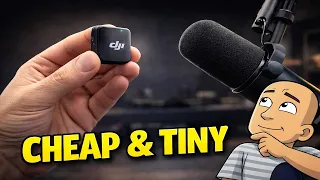
For any content creator, good audio is non-negotiable. Crisp, clear sound can make your videos feel professional. For years, getting wireless microphone gear meant a big investment. Top brands often cost over three hundred dollars for a single set. I recently found a brand new, much more affordable option. I picked up the DJI Mic 2 system right after it launched.
I got the complete charging case package. I put it to the test. First impressions were excellent. The build quality is high and the case is clever. Most importantly, the audio quality is a massive upgrade. For small YouTube channels, hobbyists, or anyone needing a simple wireless mic, this package is fantastic value. Here is my full, hands-on review of the DJI Mic 2.
What You Get in The Box
The DJI Mic 2 comes in a nicely presented box. Inside, you find everything you need to start recording. The package is thoughtful. It shows that DJI considered how people will use and store the gear.
Here is a complete list of everything included:
- The Charging Case: This is the heart of the package. It looks like a case for wireless earbuds. It has a built-in battery to charge the microphones and receiver.
- Two Wireless Microphones: These are the tiny transmitters you clip to your clothing. They are very small and lightweight.
- One Receiver: This small unit picks up the audio from the microphones. It has a hot shoe mount to attach to a camera.
- USB Transmitter Adapter: This is a clever little piece. It slides onto the base of the receiver. It lets you plug the receiver directly into a phone or computer.
- USB-C Cable: Used for charging the case.
- Two Magnetic Microphone Clips: Each microphone has a strong magnet on the back. You can hide the mic under your shirt and use the clip on the outside to hold it in place.
- Two Windshields: Foam covers that slide over the microphones to reduce wind noise.
- Storage Pouch: A nice drawstring bag to keep everything together.
First Impressions and Key Features
Opening the box reveals a device that feels premium. The charging case has a satisfying click when opened. The microphones and receiver are incredibly small. The name “Mic 2” is fitting because these are truly mini.
Some standout features became clear right away.
Clever Charging and Storage Case
The charging case is a major plus. You simply place the microphones and receiver back into their slots. The case charges them automatically. A light on the front shows the charge status for each piece.
Even better, you can store the microphones with the magnetic clips attached. This means everything has one home. You do not need to juggle separate pieces. It is an all-in-one storage and charging solution.
Automatic Pairing and Simple Setup
One of the best things about the DJI Mic 2 is its simplicity. When you open the case, the two microphones and the receiver automatically turn on and pair with each other. There are no buttons to press. You just open the case, take out a microphone, clip it on, and you are ready to record.
This makes it perfect for quick, spontaneous recording sessions.
Flexible Audio Gain Control
The small receiver has a simple switch on the side. This lets you adjust the gain. You can set it to a lower or higher level. This helps match the audio level to your camera or phone. It prevents your audio from being too quiet or too loud and distorted.
How to Connect and Use It
You can use the DJI Mic 2 with almost any device. It is very versatile.
Option 1: Connect to a Camera
This is the most common use. The receiver has a standard hot shoe mount on the bottom.
- Slide the receiver onto the top of your camera.
- Plug the included 3.5mm cable from the receiver into your camera’s microphone input.
- Clip a microphone to your shirt.
- Press record on your camera. The audio will be saved directly to your camera’s SD card.
Option 2: Connect to a Phone
You use the included USB adapter for this.
- Slide the small USB adapter out of its slot in the charging case.
- Slide it onto the bottom of the receiver. It clicks into place.
- Plug the adapter directly into your phone’s charging port.
- Open your phone’s camera or video app and start recording. The audio will be captured by your phone.
Option 3: Connect to a Computer
The process for a computer is the same as for a phone.
- Attach the USB adapter to the receiver.
- Plug it into a USB port on your computer.
- The computer should recognize it as a microphone. You can now use it for video calls, voiceovers, or recording in software.
Sound Quality and Performance
I tested the DJI Mic 2 by recording directly into my phone and computer. The difference in audio quality was immediately obvious. My voice was much clearer and fuller. Background room noise was reduced.
The microphone has a noise-canceling feature. I believe it is activated by a button on the microphone itself. This helps focus on your voice. It works well for normal indoor situations.
I did not have a chance to test the maximum range. DJI states it can work up to 400 meters away in open space. For most creators, this is far more than enough. You will likely be within a few meters of your receiver. I walked around my workshop while talking. The audio stayed perfectly clear with no dropouts.
Battery Life and Charging
The battery specs are impressive for such small devices.
- Each microphone lasts about 10-11 hours on a single charge.
- The charging case provides extra charges. It extends the total use time to about 40 hours before you need to plug in the case itself.
A great feature is the fast charge. If your microphone battery is low, just five minutes in the case gives you another hour of recording. This is perfect for those times you forget to charge your gear. You can get a quick boost right before you start filming.
Who Is The DJI Mic 2 For?
The DJI Mic 2 is an ideal system for a specific type of creator. Based on my experience, it is perfect for:
- Small YouTube Channels: If you are just starting out or have a hobby channel, this provides professional audio without a huge cost.
- Solo Creators: If you film by yourself, having a wireless microphone frees you up to move. You are not tied down by a cable.
- People Who Value Simplicity: The automatic pairing and easy connections make this system foolproof. There is no complex menu diving.
- Budget-Minded Buyers: At the price point, it offers features usually found in much more expensive systems.
It is important to know what the DJI Mic 2 does not do. Unlike some higher-end models, it does not have built-in recording. You cannot record audio directly onto the microphone itself. You must record the audio onto your camera, phone, or computer.
Price and Value For Money
I purchased two versions of the DJI Mic 2 were available at launch:
- Single Microphone Kit: This includes one microphone and one receiver. It costs around £79.
- Dual Charging Case Combo: This is the kit I bought. It includes two microphones, the receiver, and the charging case. It costs around £144.
For the price of the dual combo, you get a complete wireless microphone system for two people. You also get the excellent charging case. I believe this represents excellent value for money. It is a fraction of the cost of other major brands. The quality you get makes it a smart buy.
Overall Conclusion
The DJI Mic 2 surprised me. I took a chance on a brand-new product with no reviews. I am very glad I did.
The pros are clear: It is tiny, easy to use, and sounds great. The charging case is a game-changer for convenience and battery life. The price is fair for what you receive.
The only con to consider is the lack of internal recording. You must be recording on your other device for it to work. For most users, this is not a problem.
If you are looking to seriously upgrade your video audio without spending a fortune, the DJI Mic 2 is a top contender. It removes the worry and hassle from recording clean, wireless sound. For any creator working alone or with one other person, this system is more than enough. It delivers professional results that will make your videos stand out.
What do you think about the DJI Mic 2? Have you tried other wireless microphones? Let me know your thoughts on this new, affordable option for content creators.