
How to Fix a Sony CDP-CX400 / 455 CD Changer: A Step-by-Step Belt Replacement Guide
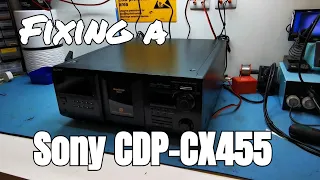
The Sony 400 CD changer is a classic piece of audio gear. Over time, a common problem arises: the rubber belts inside degrade, causing the machine to fail. The carousel stops turning, and the device becomes unresponsive. This blog post provides a detailed, step-by-step guide to fixing this issue by replacing the failed belts. While similar to the 300-disc model, the 400-disc version requires a different approach to access the belts.
Opening the Sony 400 CD Changer
The first step is accessing the machine’s interior. Unlike simpler models, you cannot just remove the back panel.
You must remove the main printed circuit board (PCB) to reach the belts.
Here is the process:
- Remove the outer case. Start by lifting off the main outer shell of the unit and setting it aside.
- Access the PCB. The board sits on top of the mechanism and is secured by rails. You will see it blocking access to the belt area.
- Unscrew the PCB rails. Remove the screws holding the PCB rails in place. There are two screws on the front and two on the rear rails.
- Detach the wire ties. Carefully bend back and remove the small wire ties that hold cables in place near the board.
- Remove rear socket screws. There are screws on the rear panel holding sockets in place. You must remove these to free the board.
- Flip the board. After these screws are out, the PCB becomes loose. You can now carefully flip it up and out of the way.
Important: You do not need to take all the cables off the board.
You can leave the main power cable connected. Simply disconnect the smaller cable harnesses by unclipping them. Peel back any tape and gently pop the cables through their retainer clips. This will allow you to fold the board upwards and rest it safely to the side.
Locating and Replacing the Faulty Belts
With the PCB moved, you can now see the mechanism clearly. The next task is to remove a plastic tray that covers the belts.
- There is a screw on the side and a screw on top of this tray.
- Remove these screws and lift the tray out.
Now you can see the problem. You will likely find two belts in bad condition.
- One belt will be extremely loose and saggy.
- The other belt may be missing completely or be a sticky, gooey mess.
- This gooey residue is common on old Sony gear as the rubber belts decompose.
You must replace both of these belts.
Fit the new belts onto their respective motor spindles and pulleys. One belt drives the CD carousel. The other belt drives the CD loader mechanism.
You cannot test the belts without reconnecting the main PCB. On some other models, you can test them immediately. On this machine, you need to at least partially reassemble it first.
Checking and Fixing Common Additional Problems
Before reassembling, it’s wise to check for other common faults. Turn the carousel by hand and feel for any resistance or sticking.
Inspect the Support Rollers
The carousel sits on four small rollers underneath. Over time, these can come loose or their clips can break. This causes a noisy carousel or makes it stick.
If a roller has popped out, the best fix is to apply a small amount of glue under it and press it firmly back into place. This will secure it.
Inspect the Carousel Timing Teeth
A frequent question involves “table error” messages. People change the belts, but the machine still does not work right. The cause is often the small plastic teeth around the edge of the carousel.
- Sensors inside the machine count these teeth to know the carousel’s position.
- If a tooth is bent or broken, the sensor loses count.
- This makes the carousel spin back and forth, unable to find its place.
Solution: If teeth are damaged, you must repair them. You can glue a small piece of plastic (like from a cable tie) in place of the missing tooth. Then, cut it to match the other teeth. This restores the sensor’s ability to count.
Inspect the Door and Loading Belt
Some people think you need to change every belt in the machine. This is not always true. To check the door mechanism:
- Remove the front bezel pieces.
- Take out the long center screw holding the carousel.
- The whole front assembly, including the door, slides out. You release it by pushing down on a couple of clips.
- Once out, you can inspect the belt that opens and closes the door.
Often, this door belt is still in good condition. It might feel springy and firm, not sticky or loose. If it looks and feels good, you do not need to replace it. This saves time and effort.
Also, clean any old, gooey belt residue from inside the machine with a pair of tweezers.
Reassembling the Sony CD Changer
Reassembly is mostly the reverse of disassembly. Follow these steps carefully.
- Replace the carousel. Line up the door assembly. A small tab must align correctly. Slide the whole assembly back into place. You will hear it click.
- Reinstall screws. Put the long center screw back in to hold the carousel. Replace the bezel screws to hold the front shroud.
- Reconnect the PCB. Bring the main circuit board back into position. Slide it onto its mounting rails.
- Reconnect all cables. Plug the cable harnesses back into their sockets on the board. Tuck the cables neatly back into their retainers and re-secure any wire ties.
- Replace the plastic tray. Screw the small plastic tray back over the belt area.
- Finalize PCB placement. Ensure the board is fully seated and all screws for the rails and rear sockets are tight.
- Replace the outer case. Finally, put the main outer shell of the unit back on.
Final Testing and Results
Before closing everything up, do a quick test.
- Power on the machine.
- Insert a CD.
- The carousel should now turn smoothly.
- The machine should read the disc and begin playing.
Important: The changer’s memory may still have old disc titles stored. You can reset this separately. A successful play test confirms the belt replacement worked.
Finish by giving the unit a good external clean. You now have a fully repaired Sony 400 CD changer.
Conclusion
Fixing a Sony 400 CD changer by replacing the belts is a detailed but achievable task. The main challenge is accessing the belts, which requires moving the main circuit board. The process involves careful disassembly, cleaning, and inspection for other common wear issues like loose rollers or damaged timing teeth.
The key steps are accessing the belts, replacing the two main degraded belts, and checking for other mechanical faults before reassembly. With patience, you can restore this classic piece of audio equipment to full working order. This repair extends the life of your device and saves money compared to buying a new one or paying for professional service. If you enjoy working on vintage electronics, this is a rewarding project. For more guides on fixing classic audio gear, consider following related repair channels and resources.