
DYMO Or BROTHER for postage lable printers?
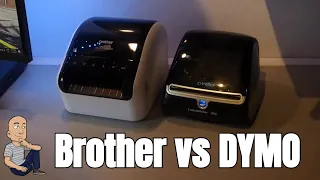
If you sell online, a reliable label printer is a must-have tool. I recently decided to upgrade my setup. For the last three years, I used a Dymo 4XL. It served me well, but it had some problems. It would sometimes jam and eat labels. Other times, it just wouldn’t print at all. After a lot of searching for a replacement, I chose a new machine. This blog post shares my hands-on unboxing and first impressions.
Why I Needed a New Label Printer
My old printer was a Dymo 4XL. It prints 4×6 inch shipping labels. I use it for platforms like eBay and Amazon. Over three years, it printed thousands of labels. The main issue was reliability. The printer became hit and miss. I needed a label printer I could count on every single time. I also wanted more flexibility with label sizes. The Dymo only prints one fixed size.
First Look at the Brother QL-1100
I decided to try a Brother QL-1100. This section covers what comes in the box and my first thoughts.
What’s Inside the Box
The box includes everything you need to get started right away:
- The Brother QL-1100 printer itself.
- A power lead with a built-in power supply.
- A USB cable for connecting to a computer.
- A sample roll of labels in two different formats.
- A clear instruction manual.
The included sample labels are great for testing. I will use the wide 4-inch format. This is the same width my Dymo used, so my workflow stays similar.
Immediate Impressions and Build Quality
My first thought was how solid the printer feels. It is more substantial than my old Dymo 4XL. A key difference is the power supply. The Brother has a built-in power supply. The Dymo uses a separate power brick. This makes the Brother look cleaner on my desk.
The Brother printer has more connection options:
- USB Port: For connecting to one computer.
- Ethernet Port: To connect the printer directly to your home network.
- External USB Port: You can print directly from a USB flash drive.
On the front, you find the control buttons. There is a power button, a page feed button, and a cut button. You also see buttons for Bluetooth, Wi-Fi, and WPS setup.
Key Differences from My Old Dymo Printer
Switching printers meant learning about new features. The biggest changes are in flexibility and connectivity.
Flexible Label Printing
The Dymo 4XL uses pre-cut, 4×6 inch label rolls. The Brother uses a continuous roll of label paper. The machine cuts each label to the exact size you need after printing.
This is a game-changer. You are not stuck with one label size. You can print a very long label or many small ones. You can make 4×4, 4×8, or 4×10 inch labels. You can print whatever your project needs.
Superior Network Connectivity
Connectivity was a major pain point with my old Dymo. The Dymo 4XL is a USB host printer only. You must have the computer it’s plugged into turned on to print. If you want to print from another device, that computer must be on.
The Brother QL-1100 solves this. I set it up on my home network using Wi-Fi. Now, any device on my network can print to it. This includes phones, laptops, and tablets. The built-in Ethernet port offers an even more stable wired connection. This network flexibility is a huge upgrade for any multi-device home office.
Side-by-Side Comparison: Brother vs. Dymo
Here is a quick look at how the two printers stack up.
| Feature | Brother QL-1100 | Dymo 4XL |
|---|---|---|
| Label Type | Continuous roll, cuts to size | Pre-cut 4×6 inch labels only |
| Power Supply | Built-in | Separate external power brick |
| Key Connectivity | USB, Wi-Fi, Ethernet, USB Direct Print | USB only |
| Network Printing | Yes, from any device on the network | No, requires host PC to be on |
| Build Quality | Very solid, premium feel | Lighter, more plastic feel |
As you can see, the Brother is physically larger than the Dymo. The photo shows the Brother next to the Dymo. The Brother is a fair bit bigger. This is due to the internal roll mechanism and built-in power.
Setting Up and First Test Print
Setup was straightforward. I installed the software from the provided link. The software installed several parts on my computer. After installation, I disconnected my old Dymo. I plugged in the Brother using the USB cable to set it up.
The moment of truth was the first test print. I sent a standard shipping label to the printer. The print speed was much quicker than the Dymo. The printer was also a lot quieter. The best part was watching it work. After printing, the machine automatically cut the label to the perfect size. It was clean and precise.
The Thermal Printing Advantage
Both printers use thermal printing technology. This is a major benefit. You never need to buy ink cartridges or toner. The printer uses heat to create the image on special thermal paper. It just works. I used my Dymo for three years and thousands of labels. I only ever bought more label rolls. The Brother will be the same. This makes running costs very low and predictable.
Final Thoughts and Recommendation
My first experience with the Brother QL-1100 has been excellent. It solved my main problem: reliability. The print test was fast, quiet, and perfect. The flexible label sizes open up new possibilities for my projects. The ability to print from any device on my network is incredibly convenient.
I definitely recommend this printer if you are looking for a postage label machine. It is well-made, versatile, and solves the common issues of older USB-only models. It is a strong upgrade from the Dymo 4XL.
I plan to post a follow-up review in a few months. I will share how it performs after heavy daily use. I want to see if it remains as reliable as it seems now. I also want to test the different label sizes in real projects. Based on this unboxing, I am very optimistic about this new addition to my office.