
Dragon Touch Vision 4 Lite Review: Is This Budget 4K Camera Any Good?
Tags: 20MP action camera, 4K action camera, action camera accessories, action camera review, action camera unboxing, budget action camera, budget tech reviews, cheap action camera, Dragon Touch, Dragon Touch review, Dragon Touch Vision 4 Lite, WiFi action camera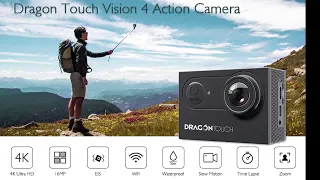
Can a budget 4K action camera costing little more than £30 really be any good? Back in 2019, I picked up the Dragon Touch Vision 4 Lite for around £32 in a promotional deal. With advertised 4K video recording, 20-megapixel photography, Wi-Fi, a wide-angle lens and a box full of accessories, it certainly looked like a lot of camera for the money.
In the video above, I unbox the Dragon Touch Vision 4 Lite, look at everything included, power it up and explore the controls and menus. This article follows that hands-on first look and highlights what impressed me, where the compromises are likely to be and what I wanted to use it for.
A quick note on timing: this is my original November 2019 unboxing and first-impressions review. The £32 price is what I paid at the time, not a current selling price. It’s also not a long-term performance test, so I won’t claim to have verified its 4K picture quality, stabilisation or battery runtime in this video.
What Is the Dragon Touch Vision 4 Lite?
The Dragon Touch Vision 4 Lite is a small action camera intended for recording video and taking still photos, with various mounting options for different situations. Its appeal is straightforward: it offers the sort of features people associate with more expensive action cameras, at a considerably lower entry price.
Features advertised on the packaging and mentioned in my unboxing include:
- 4K video recording capability.
- 20MP still photography.
- Electronic image stabilisation (EIS), as advertised for the model.
- Built-in Wi-Fi connectivity.
- A 170-degree wide-angle lens.
- A 2-inch rear LCD screen.
- Different recording resolutions and a slow-motion option.
- Support for memory cards up to 64GB, according to the advertised details shown.
- Remote-control operation and a selection of mounting accessories.
Those are advertised features, rather than specifications I independently benchmarked. The real question during this first look was whether the camera and its accessories felt like reasonable value for the price.
Dragon Touch Vision 4 Lite Unboxing: What’s in the Box?
The first surprise was just how much came in the package. In addition to the camera itself, there was a separate box containing a large collection of fittings and accessories. If you’re buying an action camera for occasional projects, having the relevant mounts included can save you buying lots of extras separately.
In my package, I found:
- The Dragon Touch Vision 4 Lite action camera, supplied inside its waterproof housing.
- Two removable batteries.
- A small remote control for triggering photos and video.
- A USB charging/data cable.
- Various mounting brackets, clips and adapters, including different offset fittings.
- A clamp-style fitting suitable for attaching the camera to something such as bicycle handlebars.
- Adhesive pads and cable ties.
- Straps and other mounting accessories.
- A mount with a standard quarter-inch screw thread.
- A cleaning cloth and brief quick-start instructions.
- What appeared to be a replacement rear housing cover or window.
The quick-start leaflet was fairly basic, pointing you towards charging and the companion app rather than providing a particularly detailed walkthrough. But the overall accessory bundle was generous for an action camera costing around £32.
First Impressions of the Camera and Build
Removing the camera from its housing reveals a very compact unit, which is exactly what you’d expect from this type of product. The camera itself is small enough to be mounted out of the way when filming practical projects.
I wasn’t planning to use the waterproof housing for my own intended projects, so I was particularly interested in what the camera was like outside it.
On the body you’ll find a shutter button, an indicator light, a front power/mode button, a rear screen, and up/down controls for navigating the menus. The video also shows a micro-USB connection, micro-HDMI output and a memory-card slot.
The rear 2-inch LCD is not a touchscreen. Instead, you navigate using the physical buttons. That makes the interface more old-fashioned than on some more expensive cameras, but it gets the job done for making basic setup changes.
Two Batteries Included: A Useful Bonus
One of the things I liked most about the package was the inclusion of two batteries. At this price, I thought that was a genuinely useful addition.
A spare battery is handy for longer filming sessions or situations where you don’t want to stop a project to wait for the camera to recharge. I didn’t measure battery runtime in this unboxing, but having a second one available is clearly more convenient than being supplied with only one.
I also appreciated a small design detail in the battery compartment: the battery has a pull tab to make it easier to remove. Anyone who has struggled to get a snugly fitted battery out of a compact gadget will understand why I liked that feature.
The Included Remote Control Is More Useful Than You Might Think
Another accessory I nearly overlooked during the unboxing was the remote control. For the sort of recording I had in mind, this was one of the more appealing features of the whole package.
I was interested in using the camera for time-lapse-style project photography, such as documenting LEGO builds. With the camera mounted somewhere out of the way, a remote makes it easier to take individual pictures or start and stop recording without having to reach up and touch the camera every time.
The same idea could be useful for filming workshop tasks or capturing wildlife in the garden where you don’t want to disturb the camera’s position. In the video, I discuss those possible uses rather than presenting them as completed field tests.
Powering Up and Exploring the Menus
After fitting the battery, I powered the camera on for the first time. The menu design immediately reminded me of an older Windows-style interface—not especially modern-looking, but straightforward enough to navigate.
The buttons let you move through the options, choose recording modes and select the available video resolutions. There are also photography settings and other operating modes.
My feeling was that most people would go through these options during their initial setup and then leave the camera configured for the majority of their shooting.
It’s worth making that distinction: this first-look video shows the menu options and the camera switching on, but it doesn’t include a controlled assessment of picture quality at each resolution or a test of how effective the advertised electronic stabilisation is.
Could You Use the Dragon Touch Vision 4 Lite as a Dash Cam?
One feature I noticed while looking through the settings was a car mode. Together with the mounting accessories, that suggests a possible use as a very inexpensive camera for recording a journey.
However, I would treat this as a possible secondary use rather than assume it’s a complete substitute for a dedicated dash cam. A purpose-built dash cam may provide features such as reliable loop recording, automatic power-on, proper vehicle mounting and better handling of difficult lighting conditions.
My video identifies the car mode as an interesting option; it does not test the Vision 4 Lite for long-term in-car reliability. Any mounting position should also be secure and must not obstruct the driver’s view or interfere with vehicle controls.
What About the Waterproof Housing?
The camera arrives already fitted in a protective waterproof housing, which is another useful addition to the bundle. There also appeared to be a spare rear housing piece in the accessory box.
I didn’t carry out an underwater test in this video and wasn’t planning to use the housing for the filming projects I had in mind. If you intend to use the camera around water, check the housing is properly sealed and follow the manufacturer’s instructions before exposing it to water. Don’t assume the bare camera body is waterproof simply because a protective case is supplied.
What I Liked About the Dragon Touch Vision 4 Lite
For a camera bought at a promotional price of around £32, there were several things that immediately stood out.
- Excellent accessory bundle for the price: lots of mounts, clips, straps and fittings included.
- Two batteries: welcome flexibility for longer sessions.
- Remote control: particularly useful for project photography and filming with the camera mounted out of reach.
- Compact body: easy to position in tighter spaces.
- Practical battery pull tab: a small but thoughtful touch.
- Plenty of settings to explore: multiple resolution and shooting options.
There were also some points to keep in perspective. The rear display isn’t touch-enabled, the menu presentation is fairly basic, and the video doesn’t establish whether its advertised 4K recording, EIS or still-image performance matches a more expensive action camera.
Who Might Find This Budget Action Camera Useful?
Based on the design, included accessories and my original plans for it, I could see the Vision 4 Lite appealing to people who want a low-cost camera for occasional rather than professional filming.
Possible uses include recording hobby projects, documenting LEGO builds, shooting workshop time-lapse sequences, trying out different camera mounting positions and taking occasional outdoor footage with the appropriate housing.
That doesn’t mean it will necessarily perform brilliantly at every one of those tasks; image quality, sound quality and stabilisation would need proper testing before drawing those conclusions. The point of my first look was that it offered a lot of creative possibilities without a large initial outlay.
Dragon Touch Vision 4 Lite: Frequently Asked Questions
Is the Dragon Touch Vision 4 Lite a 4K action camera?
It was sold and advertised as a 4K action camera. My original video shows the camera, its packaging and menu options, but doesn’t include a technical test of recorded 4K detail or frame rates.
Does it come with two batteries?
Yes. The package I unboxed included two removable batteries, which I considered particularly good value at the price I paid.
Is the rear screen a touchscreen?
No. The 2-inch rear display on my unit is operated using the camera’s physical buttons.
Does the Vision 4 Lite include a remote control?
Yes, my camera came with a remote that can be used to trigger shooting functions without directly handling the camera.
Is the camera waterproof?
Mine was supplied in a waterproof housing. I did not test its water resistance, so follow the maker’s housing instructions rather than assuming the camera itself is waterproof without the case.
Was it really only £32?
That was approximately what I paid in a promotional deal in 2019. Prices and availability may have changed significantly since then.
Final Thoughts: Good Value at £32?
My first impressions of the Dragon Touch Vision 4 Lite were positive, especially considering how little I paid for it.
It was compact, came with an impressive collection of mounting accessories and included two batteries and a remote control. Those extras are meaningful if you’re planning to use it for workshop projects, LEGO builds or other simple filming jobs.
The interface felt fairly basic, and the real test of a budget action camera is ultimately the footage it produces. That’s something this short unboxing didn’t establish, so I wouldn’t treat it as proof that the Vision 4 Lite matches a more expensive camera for image quality or stabilisation.
But viewed as a budget camera unboxing and first look from 2019, I thought it offered a surprisingly complete package for the money.
Watch my original video at the top of the article to see the contents of the box, the camera’s controls and the first power-up for yourself. For more hands-on consumer technology and workshop reviews, visit Sortitoutman.com and subscribe to Sortitoutman on YouTube.