
A Real World Review: 3 Months with the Bambu Lab H2C Multi-Color 3D Printer
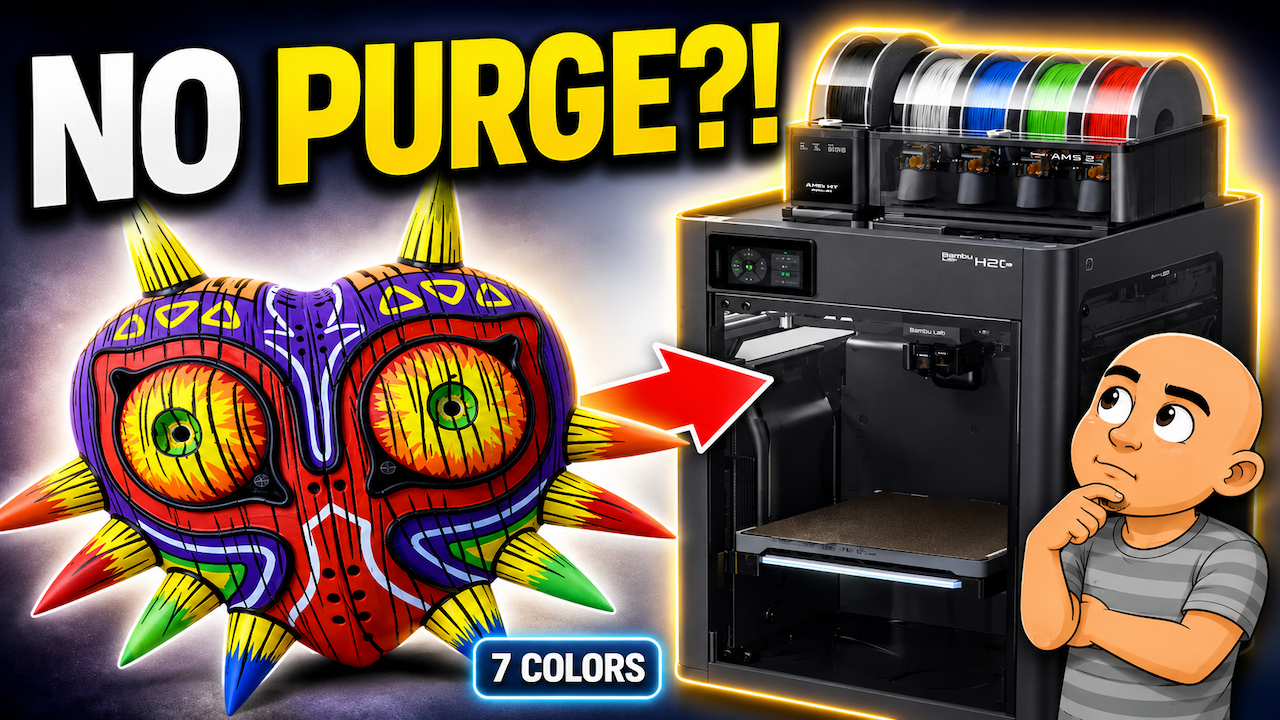
For fans of 3D printing, few things are as exciting as making objects in full color. For years, this process has been slowed down by long print times and one major problem: huge amounts of wasted filament. For the last three months, I’ve been daily driving the Bambu Lab H2C, a printer that promises to solve that exact issue. After installing this machine with my own money and running it for over 500 hours, here is my honest experience from the unboxing to daily use.
The Problem That Sent Me Looking
My 3D printing journey changed two years ago when I bought a Bambu Lab X1C. What really captured me was not print quality alone. It was the AMS system. It let me use multiple colors. I was so impressed, I bought three more units a week later.
This system gave me freedom. I could change colors without touching the filament during a print. But this freedom had a big cost.
- Massive Filament Waste: Each time the printer changed colors, it had to “purge” the old filament out of the single nozzle. On long prints, the waste could be more filament than the actual model.
- Longer Print Times: All that purging adds hours, sometimes days, to a print job.
- Higher Costs: More time means more electricity used. It also means your printer is tied up for longer.
I knew there had to be a better way. So, when Bambu Lab announced their new H2C, a seven-color printer with almost no purge waste, I was ready. I ordered it minutes after the launch.
Unboxing and Setup: It’s a Serious Machine
The first thing you notice about the H2C is its size. Seeing photos online does not prepare you. The H2C is big, and it is heavy. When you try to move the box, you know immediately it’s a serious piece of hardware.
Unboxing it feels very familiar if you know Bambu Lab. They follow the “Apple of 3D printing” approach. Everything comes pre-assembled. You are not building a printer.
Your job is simple:
- Remove transit screws.
- Pull out packing blocks.
- Unclip transport brackets.
That’s basically it. You are unpacking and preparing, not assembling.
From there, you power it on, connect to Wi-Fi, and let it run updates. The printer handles all major calibrations by itself. This includes bed leveling, nozzle checks, and system checks. You just let it do its thing. The whole process from opening the box to your first print takes about one hour.
What Makes the H2C Different: Dedicated Nozzles
This is the core idea that makes the H2C special. At its heart, it is similar to the Bambu H2D, which has two nozzles. But the H2C adds a key upgrade on the right-hand side.
It uses Bambu’s motorized nozzle changer. A rack next to the build plate holds up to six inductive-heated nozzles. Combined with the fixed left nozzle, this gives you seven colors or materials. The best part is that each one has its own dedicated nozzle.
This is the game-changer.
On a normal color printer, one nozzle handles all filaments. It has to flush the old color out every single change. On the H2C, each filament stays in its own nozzle for the entire print. The printer even stores data about what material and color were last used in each nozzle. This helps it choose the cleanest option for your next project.
To make space for the nozzle rack, the H2C has a slightly smaller build volume than the H2D. Its size is 30 by 30 by 325 mm. On paper, that sounds small. In my real-world use, I have not found it limiting. It is still much larger than the build area on my X1C.
Seeing the Savings: A Real Print Test
One of the first prints I made was a complex, seven-color Majora’s Mask model. This print showed me the power of this machine.
If I had printed this on my X1C, the project would have been a nightmare.
- Estimated Time: Nearly two weeks.
- Estimated Waste: Over 2 kilograms (over 4.4 pounds) of pure purge filament.
On the H2C, the same print was a different story.
- Actual Time: Just over four days.
- Actual Waste: Almost zero purge waste.
Yes, you still get “prime towers” on complex prints. These are small structures that help start each nozzle layer. But compared to the flushing on a standard printer, the material savings are enormous.
The print quality was also better. The colors were crisp. There was no color bleed between layers. There were no weird transitions. Each filament having its own nozzle makes a visible difference.
Daily Use After 500 Hours: Ready for Anything
After months of daily use, what I love most isn’t even the seven colors. It’s the machine’s readiness and flexibility.
I can keep multiple nozzles mounted and ready to go at all times.
- A 0.2 mm nozzle for super-fine details.
- Several 0.4 mm nozzles for general and multi-color printing.
- A 0.6 mm nozzle for fast, single-color prints.
Switching between them takes seconds. I tap the screen, the machine swaps the nozzle, and it’s done. No tools. No disassembling hot ends. This flexibility has changed how I approach printing.
I am now happy to print multi-color pieces because I’m not constantly thinking about the waste. The H2C is now my main daily printer. If a project needs more than one color, I always start it on this machine. It’s reached the point where, if I could afford it, I would sell my X1C and get another H2C.
Did I Have Any Issues?
Yes, I did have a couple. It’s important to be honest. A few prints in, the machine froze. The timer was running, but the print head wasn’t moving. Pressing stop did nothing. I had to power cycle it and start over.
Thankfully, there have been firmware updates since then. I have not had the freeze happen again. It is something to be aware of.
My other issue was occasional bed adhesion. A couple of prints started to come loose. It was not a big failure, but enough to notice. My fix was simple. I now increase the bed temperature by 5 degrees at the start of every print. Since I started doing that, I have had no more problems.
Who Is This Printer For?
Let’s be clear. The Bambu Lab H2C is not cheap. And it is not for everyone.
But if multi-color printing is your main goal, this machine removes the biggest frustration. It cuts out the purge waste and the painfully long print times. Once you stop worrying about those things, you start printing and designing in new ways.
Right now, the H2C is a real product that works. It sits in my workshop and prints every day. It has made multi-color printing fun and efficient again for me.
Ready to see the H2C in action? You can watch the full video review that inspired this post on YouTube.