
The Divoom Times Frame: A Smart Gadget That Transforms Your Desk
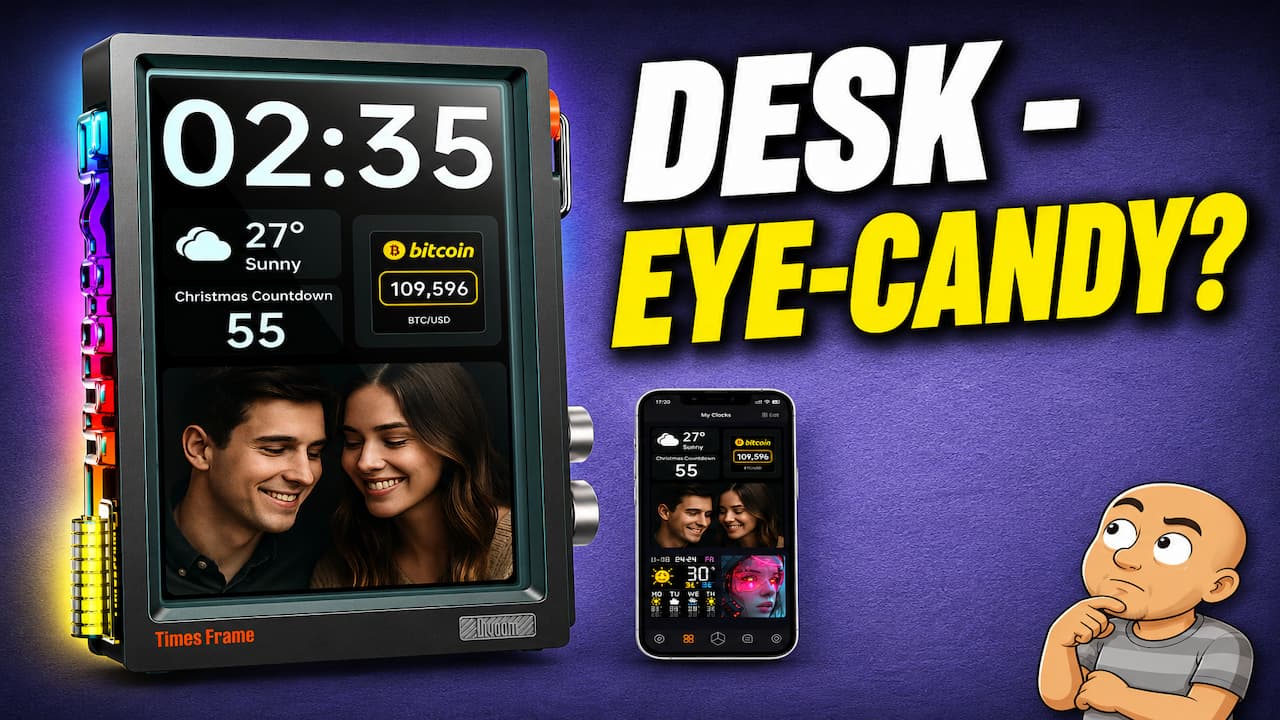
Is your desk space a little boring? Do you want a gadget that is useful and looks amazing? The Divoom Times Frame is a cool new product that might be perfect for you. It’s much more than just a clock or a photo frame. It’s a smart display that can show you information, play your videos, and look like something from the future.
This guide will show you everything the Divoom Times Frame can do. We will look at how it works and how easy it is to set up. You will learn why this device is a great way to add some style and function to your office or room.
What Is the Divoom Times Frame?
The Divoom Times Frame is a smart display. At first look, it seems like a sleek clock or a modern picture frame. But this device is packed with features that make it stand out. Its main attraction is its transparent LCD screen.
You can partly see through this screen, which creates a stunning and futuristic look. It uses three layers of strong tempered glass to build this effect. The main screen is a high-quality IPS display. The resolution is 1280 by 800 pixels, so everything looks sharp and clear.
What’s In the Box?
When you get your Times Frame, here is what you will find inside:
- The Divoom Times Frame: The main unit feels solid and well-made.
- A Printed User Manual: This helps you get started.
- A Super Soft Cleaning Cloth: This is very handy for keeping the glass screen spotless.
- A Braided USB Cable: The cable (USB Type-A to Type-C) is used for power. The braided design is a nice touch and makes it more durable.
Key Features of the Times Frame
The Divoom Times Frame is loaded with useful and fun features. Here are the main things it can do.
A Smart Display for Photos and Videos
The device works as a full digital photo frame. It has 64 gigabytes of internal storage. You can load thousands of your favorite photos onto it.
But it does more than just photos. You can also store short video clips. Each clip can be up to 60 seconds long. When the video plays, it also plays the sound through the device’s built-in speaker. This lets you share your favorite moments with sight and sound.
Customizable Clock Faces and Widgets
The main screen usually shows the time. But you are not stuck with just one clock design. Using the Divoom app, you can choose from many different clock face styles.
Around the clock, you can add widgets. Widgets are small boxes that show other information. You can add widgets for things like:
- Stocks: Track your favorite stocks.
- Time Zones: See the current time in other parts of the world.
- Social Media Stats: Check your follower counts.
- Markets: Watch financial markets.
- Weather: See the forecast for your area.
You can change these widgets to show the data that matters most to you.
Pixel Art Gallery
Divoom is famous for its fun pixel art. The Times Frame does not forget this feature. Through the app, you can browse a huge gallery. This gallery has thousands of pixel art pieces created by other users. You can download your favorites to display on your frame. This adds a playful and personal touch.
Side RGB Lighting
Down the side of the frame, you will find a strip of glass. Behind this glass is an RGB light. This light can pulse and glow in many colors.
You can set it to react to sound. It will flash along with music or any noise nearby. Or, you can pick from many other light display modes. It adds a cool glow to your desk.
Physical Controls
The Times Frame is smart, but it is also simple to use. You don’t always need your phone. On the side of the device, you will find easy-to-use controls.
- Two Rotary Dials: These dials feel good to turn and have a satisfying click. The top dial lets you scroll through your different clock faces. The bottom dial controls the screen brightness or the speaker volume.
- Two Control Buttons: You use these buttons to select items and enter the menu.
On the back of the unit, there is a single USB port for power input.
How to Set Up Your Divoom Times Frame
Setting up the Times Frame is an easy process. Just follow these simple steps.
- Plug It In: Connect the braided USB cable to your Times Frame and a power source.
- Download the App: When the device turns on, it will tell you to download the Divoom app. You can get it for free on iOS or Android.
- Connect the App: Open the app on your phone. Choose “Add Device” and then follow the instructions on your screen. The app will find and connect to your Times Frame.
- Start Customizing: Once connected, you can use the app to do everything. You can pick clock faces, add widgets, download pixel art, and set up the side lights.
Using the On-Device Controls
After you set things up with the app, you can use the dials and buttons on the frame.
Turning the top dial scrolls through your saved clock faces. Press the “select” button to choose the one you want.
Turn the bottom dial to adjust the screen brightness or speaker volume. Pressing this dial will open the main menu on the screen. From here, you can change the RGB light settings or turn on sleep mode.
Why the Divoom Times Frame Deserves a Spot on Your Desk
The Divoom Times Frame is a great gadget. It combines style, function, and fun in one package. Its transparent screen looks like nothing else you’ve seen. It turns a simple desk accessory into a conversation piece.
It is also very useful. It keeps important information like the time, weather, and news right in front of you. You can also enjoy your personal photos and videos in a new way. The ability to change its look with new clock faces and pixel art means it never gets old.
The build quality is high, from the strong glass to the nice braided cable. The physical controls make it easy to use without your phone. If you like cool tech that also does something useful, this is a perfect choice.
Conclusion
The Divoom Times Frame is more than just a clock. It is a smart, stylish hub for your desk. It shows your important info, displays your memories, and looks amazing while doing it.
Its setup is easy with the phone app. After that, you can control everything with the click of a dial. The transparent display truly has to be seen to be believed. It gives any room a modern, tech-forward feel.
If you are looking for a way to upgrade your workspace or add a cool gadget to your home, take a close look at the Divoom Times Frame. It might just be the perfect fit